Showing posts with label charging. Show all posts

Sunday, 19 February 2012

How to Hard Reset Nokia C5-03 With Button Combination

How to Hard Reset Nokia C5-03 With Button Combination

Let’s perform a reset in your Nokia C5-03 device. There is two way to reset Nokia C5-03 phones.
nokia c5 03 266x300 How to Hard Reset Nokia C5 03 With Button Combination
  • Soft Reset
  • Hard Reset

Soft Reset for Nokia C5-03

  1. Open your numeric keypad or dial option for making call
  2. Type *#7370#
  3. Dial or press green key/call key.
it will ask you security code. input your security code.
You are done!

Hard Reset for Nokia C5-03


  1. Switch off your mobile
  2. Press and hold three keys
  • Green key(call key)
  • Lock button
  • Volume up key
3. Press “switch on” button(End call key)
Hold above three keys until your phone switched on and country selection screen come.

Nokia X7-00 Memory Card Not Detected Problem Solution

Here's the Solution for Nokia X7-00 memory card not detected problem. Locate the highlighted components and begin checking it out. Do trace each of the connection line paths, start on the VMEM then down to each corresponding MMC slot pins connection.
Nokia X7-00 MMC not detected repair guide
View the larger image here.

Nokia X7-00 Insert SIM Card Problem Jumper Ways Solution

This solution might help you to fix Nokia X7-00 with "Insert SIM card error" problem. If the phone doesn't recognize any SIM card inserted to it this might be your guide on how to solved and mend the issue.

You may start by checking the SIM card pin connector for possible damaged or lifted. Check if it needs a  re-soldering or just cleaning. The colored line paths represents each of the corresponding SIM card connector pins, just do trace each of them carefully then mend to reconnect if somehow there is open or cut connections. Check each of connected capacitors , replace if already damaged.


View the larger Nokia X7-00 Insert SIM Card Solution here.

If the solution above doesn't fix the problem, then the trouble might possibly lies on the Gazoo (ASIC) chip.
Reworking it might only fix the said nnsert SIM card problem on Nokia X7-00.

Nokia X7-00 Display Problem Solution

Here's a troubleshooting hints for Nokia X7-00 LCD Display problem such as blank display or no display at all and otherwise a corrupted or garbled display. This solution may help you for easy repair procedures.

Note: This only works if you can still hear something on the phone like tones, incoming alerts and not on a white screen problem or hang up on white screen situation.

The quick step to fix display problem, is that you have to verify a working LCD, just replace the LCD screen module at once just to ensure that the LCD is working or not and then proceed to hardware troubleshooting after confirming that the LCD is still fine. Just locate the highlighted components shows on figure solution picture below and do have a careful check up on each one of them one by one.

 - Check the display pin connector, clean it, rework or re-solder it if necessary.
- Check the capacitors and coils, replace if necessary, and then check the VBAT voltage and the VIO voltage on it. Those are the supply voltages for the display
- Check the two DSI line choke filters
- If those parts above already checked and seems nothing wrong, the problem possibly exist on the Display UI chip. Reworking or replacing it will only fix the display problem

For damaged or lifted display pin connector or due to wet or water damaged, here's the tracing guide if you might think that the problem lies on a broken display signal line paths.


So, hope this helps you in fixing display problem on Nokia X7-00

Nokia X7-00 Not Charging Problem Solution

Here's the Nokia X7-00 Solution for Not Charging Problem on the USB pin connector. This may help if the phone suffered wet damaged and resulted to no charging indication when the wall charger is plug-in.

Before proceeding, ensure that the battery and the battery charger are in good working condition.
- Check all the components shown on the image below, you may start by checking the USB pin connector.
- Then the fuse, diode, capacitors and filter coil for possible open or short circuit.
- Trace each of the connection line paths from USB pins down to the components where it is directly connected.
 view larger image here

Now, if happens if the above parts were already been checked and seems all were okay, the next step is to determine if the battery sense resistor is working fine. see the image below.
You can check around 5V across on the R2200 resistor when the charger is plug-in. That resistor has a 10mOhms, you may replace it if found damaged.

view larger image here
The final option is working on the EM-IC (Power IC) if the above procedures doesn't solved the charging problem. You may try to rework first the ASIC chip, then replace if necessary and or after reworking on it doesn't still fix the problem.

Nokia X7-00 shows 'Charger Not Supported' error repair solution

Here's the guide on how to fix the Nokia X7-00 that shows "Charger not supported" error when the battery charger is being plug-in. This solution below shows the so-called BTEMP 47K resistor in Nokia X7-00 devices that mostly known by technicians that if being damaged will result to Charger Not Supported problem. This is another not charging problem issues but with a different method on how to fix it.

You can view the larger image here. Just locate that component mounted at the side of the PCB board and replace it. Some problems may also cause by a battery connector, so ensure that the battery terminal are also okay, before attempting to replace it.

Nokia X7-00 Handsfree Speaker No Audio Problem Solution

Here's the solution for Nokia X7-00 in fixing handsfree speaker no audio problem. The Nokia X7-00 has two handsfree speakers located at the bottom left and right corners of the device. If something went wrong like if there is no sounds can be heard if the handsfree or loudspeaker is being activated, this solution might help for your repair.

Hints in troubleshooting Nokia X7-00 not working handsfree speaker problem.
You may start by manually checking the two speakers using a multimeter tester.
Check the filter coils, for possible damaged, clean the surroundings including the speaker terminal pads if oxidized found.
Trace the connection line paths between the speaker terminal pads to each filter coils where it is being connected.

If the first attempt of those methods above doesn't fix the speaker audio problem. The next option is to work on the Audio Codec IC. You may check the VBAT 3.7v across the filter inductor coil, this is the supply voltage to make the Audio IC work.  If the voltage is okay, check all the surrounding components of the Audio chip.


 Rework the Audio Codec IC and then replace if necessary. However, if the problem still exists, there are two options which can be suspected as became faulty - its either the ASIC (Power IC) or the CPU. But working this chips needs a great soldering skills, so if you don't have guts to do it, just ask an assistance to your head technician on duty.

Friday, 27 January 2012

Nokia 1600 1110 Contact service

first check this


Second solution
just full flash with jaf
use easy cable
latest or lower version flash mobile
write good pm
then unlock
problem solve

tested solution

Thursday, 26 January 2012

Nokia N82 China Mic Problem Solution Ways Jumpers.

this diagram is to show that how to solve mic problem in China Nokia N82.first of all change the mic then check the prints that are shown in diagram and make jumpers as given in the attached diagram.all jumpers are indicated with two different colors so that can be identified easily.


and the mic prints goes near mmc card base.
for more detail and new tips and tricks about this problem keep visiting this page we will update it timely with new diagrams.some related post are also given bellow you can read them also for more information.

Nokia N82 China speaker Ringer Buzzer Problem ways jumpers.

make these jumpers if you are facining ringer buzzer problem in Nokia China N82.so first of all clean all these parts that are indicated in diagram and leave it to dry for a few mints.resold these parts and make these jumpers as given in posted diagram.make sure that you have change ringer.


for more detail and new tips and tricks about this problem keep visiting this page we will update it timely with new diagrams.some related post are also given bellow you can read them also for more information.

Nokia China N82 Touch Pad Touch screen Problem Solution Ways Jumpers.

if you are facing touch screen and touch pad problem in china nokia n82 than this diagram will help you to solve this problem.in this diagram you can understand four pins are indicated with screen panel and also on board.these jumpers are indicated with different colors so that can be found easily.


and if with only these jumpers this solution will not be don then apply little heat with hot air on cpu and in cpu you can see where these links go.
for more detail and new tips and tricks about this problem keep visiting this page we will update it timely with new diagrams.some related post are also given bellow you can read them also for more information.

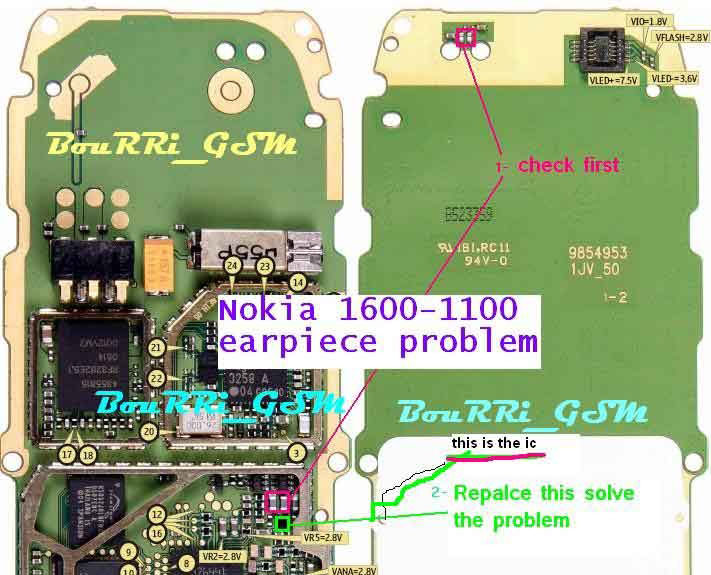
Nokia 1600 Speaker Earpiece Problem Jumpers Solutions Ways.

Nokia 1600 Speaker Earpiece repairing solution.Nokia 1600 Speaker Earpiece Mobile Repair diagram pictures Service Tips and Tricks.Make Jumpers as shown in diagram or replace the shown components .


Nokia 1600 Speaker Problem
Earpiece Problem
Speaker Ways
Earpiece Ways
Speaker Jumpers
Earpiece Jumpers

How to short Nokia 1600 PA.jumper signal problem no network low signals.

Nokia 2310 Signal No Network repairing solution.Nokia 2310 Signal No Network Mobile Repair diagram pictures Service Tips and Tricks.Make Jumpers as shown in diagram or replace the shown components


How to short Nokia 2310 PA.jumper Pa nokia 110.
here is a diagram that is showing how to jumper and short P.A of Nokia 2310.
it is used to check that mobile is getting signals or not.
if signals are to low with jumper change the P.A


Nokia 2310 signal problem no network low signals.
all components that are used in signal function are shown in the given image.
check all part shown in diagram for signal problem.
re sold re hot give part and if not solved or signals are low change replace these part.

Nokia 2310 Network Problem Network Jumpers Network Solutions Network Ways. 


Nokia 2310 Network Problem
No Network
Signal Problem
Antina Switch Ways
Antina Switch Jumpers
Antina Switch Tracks

Nokia 1600 Signal Problem Ways Solution No Network

Nokia 1600 Signal No Network repairing solution.Nokia 1600 Signal No Network Mobile Repair diagram pictures Service Tips and Tricks.Make Jumpers as shown in diagram or replace the shown components 


How to short Nokia 1600 PA.jumper Pa nokia 110.
here is a diagram that is showing how to jumper and short P.A of Nokia 1600.
it is used to check that mobile is getting signals or not.
if signals are to low with jumper change the P.A


Nokia 1600 signal problem no network low signals.
all components that are used in signal function are shown in the given image.
check all part shown in diagram for signal problem.
re sold re hot give part and if not solved or signals are low change replace these part.

Nokia 1600 Network Problem Network Jumpers Network Solutions Network Ways.

Nokia 1600 Network Problem
No Network
Signal Problem
Antina Switch Ways
Antina Switch Jumpers
Antina Switch Tracks

Nokia 1600 Ringer Buzzer Problem Solutions Ways

Nokia 1600 Ringer Buzzer repairing solution.Nokia 1600 Ringer Buzzer Mobile Repair diagram pictures Service Tips and Tricks.Make Jumpers as shown in diagram or replace the shown components 
.

Nokia 1600 parts used in ringer buzzer not working.
in the diagram components are shown that are used in ringer function.
check the parts that are shown in the image and re hot re sold and replace them if not solved after re hotting or re soldiering.


Nokia 1600 Ringer Problem
Ringer ways
Buzzer Problem
Buzzer Ways
Nokia 1600 ringer problem links ways.ringer not working.


Nokia 1600 ringer problem links ways ringer not working.
given diagram show how to repair Nokia 1600 ringer problem.
check the given links make jumper or replace parts that are indicated in the diagram. 


Nokia 1600 Ringer Problem
Ringer ways
Buzzer Problem
Buzzer Ways
Nokia 1600 ringer solution without ic.


Nokia 1600 ringer solution without ic.
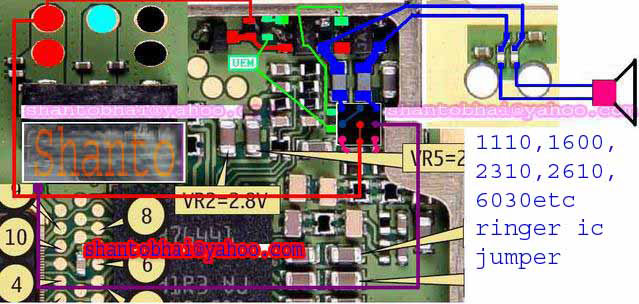
How to repair Ringer Ic Nokia 1600.Ringer ic Shorting Methods.
how to make jumper ringer buzzer ic in Nokia 1600.
make jumper like diagram and the problem will be solved.

how to solve ringer problem without ringer ic in Nokia 1600.


Nokia 1600 ringer ic jumping ways.how to short ringer ic of Nokia 1600.
how to solve ringer problem without ringer ic in Nokia 1600.
this image is about shorting ringer ic in Nokia 1600.
if ringer is not working simple follow the given link in the diagram and make jumpers as shown.

Nokia 1600 ringer ic ways track links.ringer buzzer problem solution.


Nokia 1600 ringer ic ways track links.
this image is showing all the links that comes to the ringer ic in Nokia 1600.
simple check these links and if nay link is broken make jumper as shown in the diagram.
Nokia 1600 ringer is not working problem will be solved.

Nokia 1600 Power Switch Button Ways Jumpers Solution

Nokia 1600 Power Button On Off repairing solution.Nokia 1600 Power Button On Off Mobile Repair diagram pictures Service Tips and Tricks.Make Jumpers as shown in diagram or replace the shown components


Nokia 1600 Power Button Ways
Power Switch Ways
On/off Switch Jumpers
On/Off Button Ways
Power Button Jumpers
Power Switch Jumpers

Nokia 1600 show not charging Problem, Solution Ways.

Nokia 1600 Not Charging repairing solution.Nokia 1600 Not Charging Mobile Repair diagram pictures Service Tips and Tricks.Make Jumpers as shown in diagram or replace the shown components .

Nokia 1600 show not charging when on but not show any thing when off.


Nokia 1600 show not charging when on but not show any thing when off. replace 47k resistor with any other ok board if not charging problem in Nokia 1600. if problem not soled you have to change r22 and flash the set with pm files also with latest flash file.


Nokia 1600 not charging solved 100% in a few mints.
step by step process to solve the not charging problem in Nokia 1600.
in the given diagram all steps are indicated clearly.
check all these part resold re hot and if not ok replace with new one from ok board.

Nokia 1600 charging problem parts for solution.ways links.


Nokia 1600 charging problem parts for solution.ways links.
all components that are used in charging are shown in the image.
check these parts and resold and re hot them.
if problem is not solved then you may have to change these parts also.


Nokia 1600 Charging Problem
Not Charging
Charging Ways
Charging Solution
Not Charging Solution
Charge Tracks


Nokia 1600 Charging Problem
Not Charging
Charging Ways
Charging Solution
Not Charging Solution
Charge Tracks

Nokia 1600 charging path ways track for not charging solution. 


Nokia 1600 charging path ways track for not charging solution.
all components that are used in charging in Nokia 1600 are shown in given image.
check these parts and re hot resold them.
if problem is not solved replace them with new from any ok board.

Nokia 1600 not charging problem ways solution.


Nokia 1600 not charging problem ways solution.
remove bubble resistor near the main ic if Nokia 1600 show not charging.
check some other related post given bellow for the same not charging problem of Nokia 1600.

Nokia 1600 mic problem solution ways. mic is not working.

Nokia 1600 Mic repairing solution.Nokia 1600 Mic Mobile Repair diagram pictures Service Tips and Tricks.Make Jumpers as shown in diagram or replace the shown components .


Nokia 1600 mic problem solution ways.parts used in mic problem.
this diagram is showing the most parts are used in mic function.
check these parts and re hot or resold them if some one is not working ok change it.
or see some other posts related to it in the bellow links.


Nokia 1600 mic links mic problem mic is not working.
this is a diagram about solution of Nokia 1600 mic ic problem.if mic is not working make jumper as shown in the image.
check the mic value with multimeter first of all. 


Nokia 1600 Mic Problem
Microphone Problem
Mic Ways
Microphone Ways
Mic Is Not Working
Microphone Is Not Working

Nokia 1600 Display Problem Jumpers Solutions Ways Display Light White Screen.

Nokia 1600 No Display Lcd repairing solution.Nokia 1600 No Display Lcd Mobile Repair diagram pictures Service Tips and Tricks.Make Jumpers as shown in diagram or replace the shown components
.

Nokia 1600 Blue Lcd Problem
Blue Display Problem
Lcd Connector Ways
Lcd is Not Working
Lcd Blank Display


Nokia 1600 lcd prints no display problem solution ways.lcd jack prints damaged .
in this diagram all lcd jack prints are shwon
if the lcd jeck is dameged make jumpers as shwon in the image.
check continuty and if any link is broken make jumpers.damaged 


Nokia 1600 blank display problem solve 100%.make this jumper as shown in the diagram if Nokia 1600 lcd is blank but led id lighting of lcd.
make a jumper from lcd connector pin 2 to bottom point of three leg ic on the board near keypad

light.


how to solve Nokia 1600 1112 1600 2310 6030 2626 display problem display goes off after a few mints.here is the image for display problem if display goes after a short time.

Nokia 1600 Keypad Problem Jumpers Solutions Ways .

Nokia 1600 Key Pad Not Working repairing solution.Nokia 1600 Key Pad Not Working Mobile Repair diagram pictures Service Tips and Tricks.Make Jumpers as shown in diagram or replace the shown components . 


Nokia 1600 Keypad Problem
Keypad Ways
Keypad Jumpers
Keypad is Not Working
Keypad Tracks


Nokia 1600 key pad problem solve without keypad ic.
this image is to show how make jumpers key pad ic of Nokia 1600.
make jumpers as shown in the image
key pad problem will solve without ic. 


Nokia 1600 1,4,7,* key is not working ways solution. test point if the 1,4,7,* is not working. check the outer and the point near key pad ic on the board as shown in the image. if link is not working make jumper and if link is working but keys are not working. change key pad ic. 


Nokia 1600 2,5,8,0 key is not working ways solution. test point if the 2,5,8,0 is not working. check the outer and the point near key pad ic on the board as shown in the image. if link is not working make jumper and if link is working but keys are not working. change key pad ic.


Nokia 1600 4,5,6,up key is not working ways solution. test point if the 4,5,6,up is not working. check the outer and the point near key pad ic on the board as shown in the image. if link is not working make jumper and if link is working but keys are not working. change key pad ic.


Nokia 1600 Action OK key is not working ways solution. test point if the Action OK is not working. check the outer and the point near key pad ic on the board as shown in the image. if link is not working make jumper and if link is working but keys are not working. change key pad ic. 


Nokia 1600 keypad problem solve 100%.
this image is to show that how to repair Nokia 1600 keypad problem without keypad ic.
you can short the keypad ic as shown in the diagram
it is also mentioned that which key is in the category of same links.

 
Nokia 1600 key 0,#,Left,Soft Left not working ways.
test point if the 0 # soft left and left key is not working.
check the outer and the point near key pad ic on the board as shown in the image.
if link is not working make jumper and if link is working but keys are not working.


Nokia 1600 keypad problem solve in three steps.
this image is about solving Nokia 1600 key pad problem in just three simple steps.
step1 re hot resold dial ic or change it.
step2 remove two resistors shown in the image.


step 3 Re hot UPP.

Nokia 1600 keypad ways track.keypad not working problem.
this image is showing the keypad ways from ic to the button.
you can check that the links are working ok or not these are the test point for Nokia 1600 keypad problem.
if links are working and showing continuity then rehot or resold the dial ic.
if it is not working till now you have to change the dial ic.